> ## Documentation Index
> Fetch the complete documentation index at: https://openlayer.com/docs/llms.txt
> Use this file to discover all available pages before exploring further.
# Observability
> See every gateway request as a trace in your Openlayer project, with no instrumentation
Every request through the gateway can be published as a trace in Openlayer, with no code in your
apps. It's the visibility side of the gateway: while usage limits and guardrails enforce your rules,
observability shows you what actually happened.
Setting it up is two steps. You **connect a workspace** once, then add **destinations** that say
whose traffic lands in which data source.
## Connect a workspace
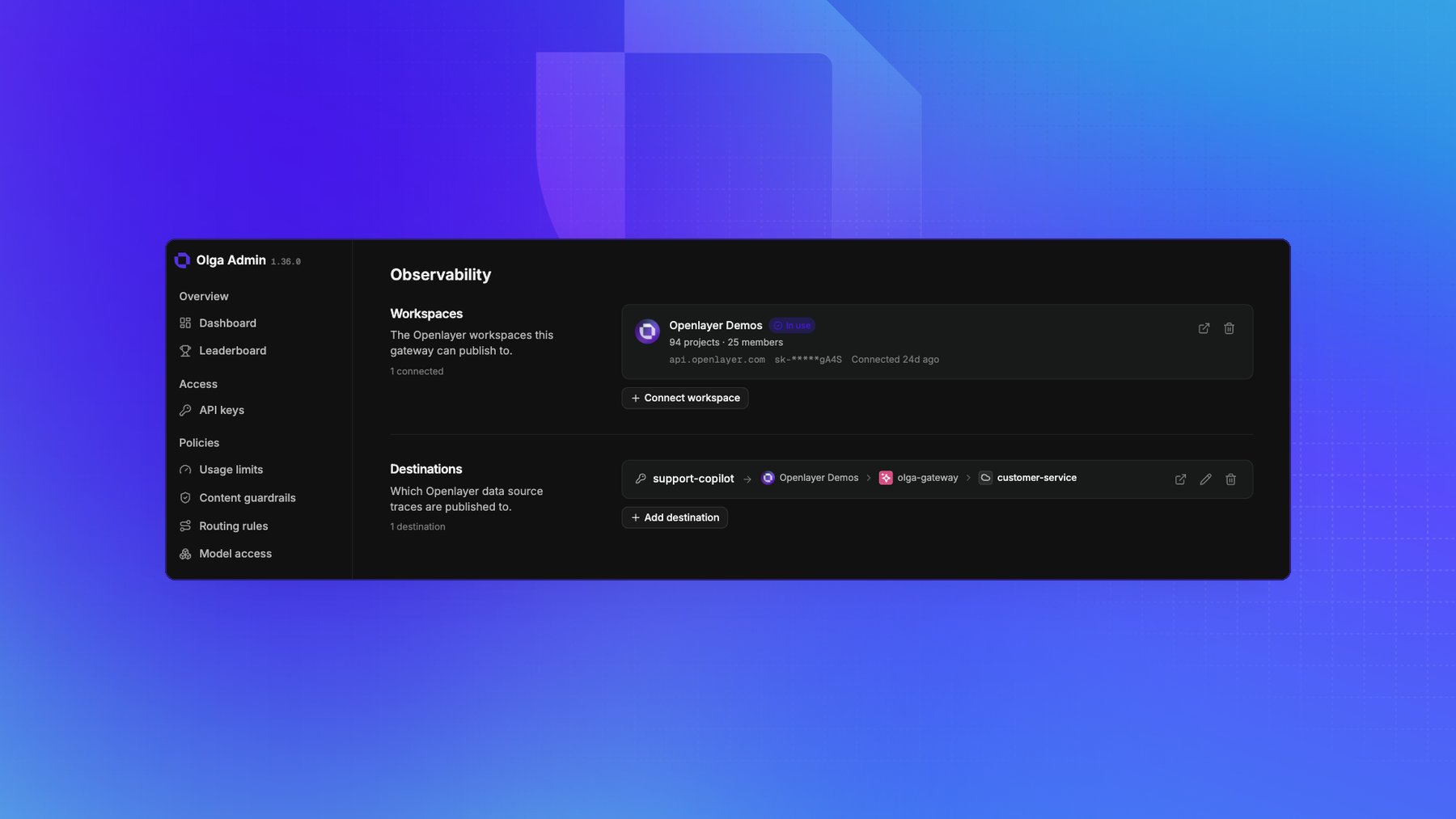
On the **Observability** page under Settings, connect an Openlayer workspace:
* **API key**: an Openlayer API key for the workspace. The gateway verifies it before storing it, and
encrypts it at rest.
* **Base URL**: the Openlayer installation the workspace lives in. Leave it blank for Openlayer's
public API, or set it if you run Openlayer on-premises.
The gateway reads the workspace's name and details back from Openlayer, so the card confirms which
workspace you connected, along with its project and member counts and when it was connected. You can
connect more than one, which is what lets a single gateway publish into separate workspaces.
Disconnecting a workspace discards its credential and removes the destinations that used it.
 ## Route traffic to a data source
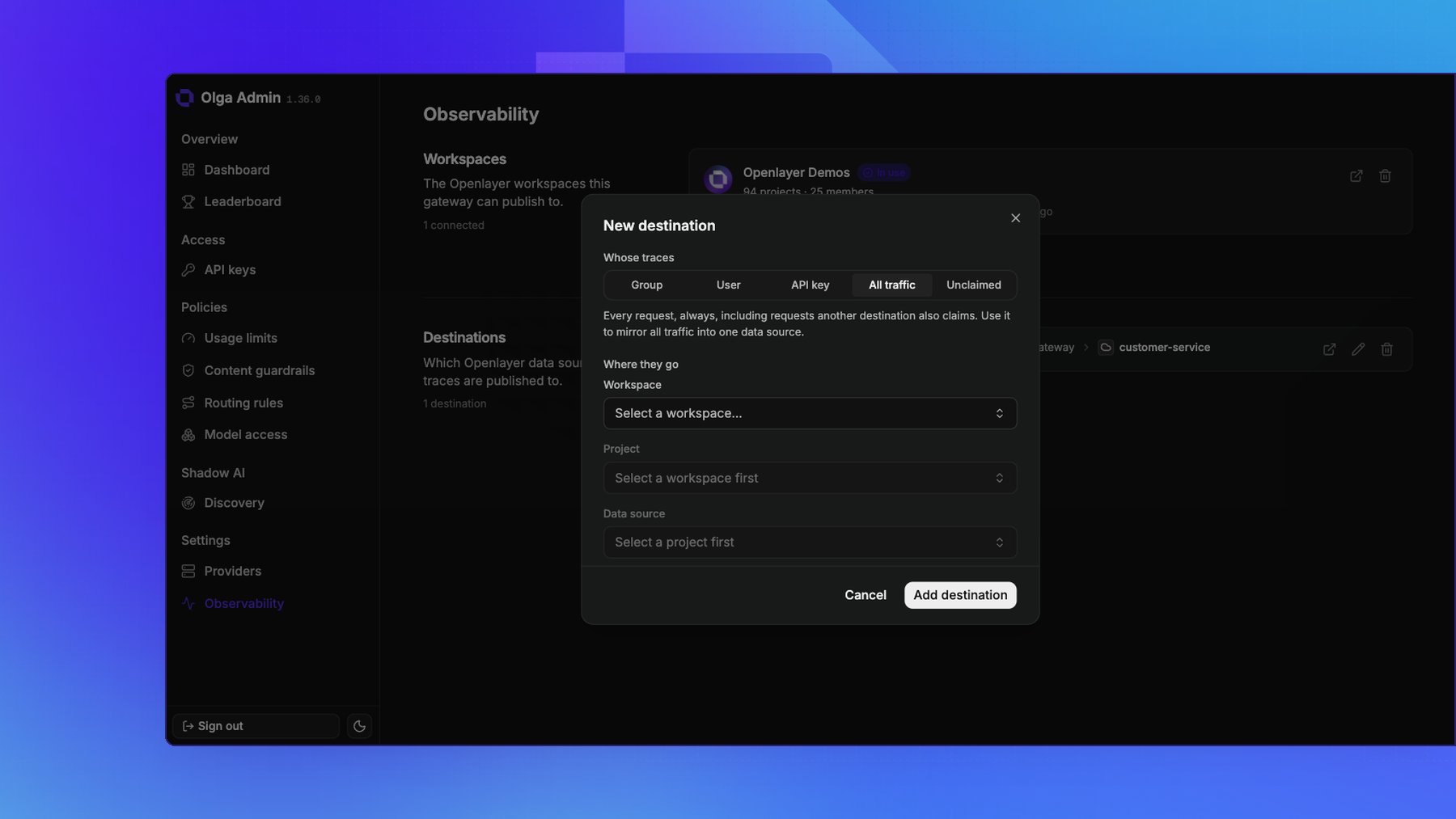
A **destination** pairs a target with the Openlayer data source its traces land in:
* **Whose traces**: a **Group**, a **User**, one **API key**, **All traffic**, or **Unclaimed**. The
group picker also offers **No group**.
* **Where they go**: a workspace, then a project, then a data source. You can create a project or a
data source from the picker without leaving the portal.
Destinations fan out. Unlike a routing rule, every destination whose target covers the calling key
receives the trace, so a group's destination and a destination for one user on that group both get a
copy. Two exceptions shape the set:
* **All traffic** always fires, including on requests something else already claimed. It's how you
mirror everything into one data source while specific targets keep their own.
* **Unclaimed** is a fallback rather than a rule that fires alongside the others. It takes only the
traffic no more specific destination claimed, so a key with a group destination publishes to that
group's data source and not also to the default.
If two matching destinations name the same data source, the trace is published once, not twice.
Use **mute** to stop a destination from receiving traces without losing which data source it pointed
at.
## Route traffic to a data source
A **destination** pairs a target with the Openlayer data source its traces land in:
* **Whose traces**: a **Group**, a **User**, one **API key**, **All traffic**, or **Unclaimed**. The
group picker also offers **No group**.
* **Where they go**: a workspace, then a project, then a data source. You can create a project or a
data source from the picker without leaving the portal.
Destinations fan out. Unlike a routing rule, every destination whose target covers the calling key
receives the trace, so a group's destination and a destination for one user on that group both get a
copy. Two exceptions shape the set:
* **All traffic** always fires, including on requests something else already claimed. It's how you
mirror everything into one data source while specific targets keep their own.
* **Unclaimed** is a fallback rather than a rule that fires alongside the others. It takes only the
traffic no more specific destination claimed, so a key with a group destination publishes to that
group's data source and not also to the default.
If two matching destinations name the same data source, the trace is published once, not twice.
Use **mute** to stop a destination from receiving traces without losing which data source it pointed
at.
 ## What's in a trace
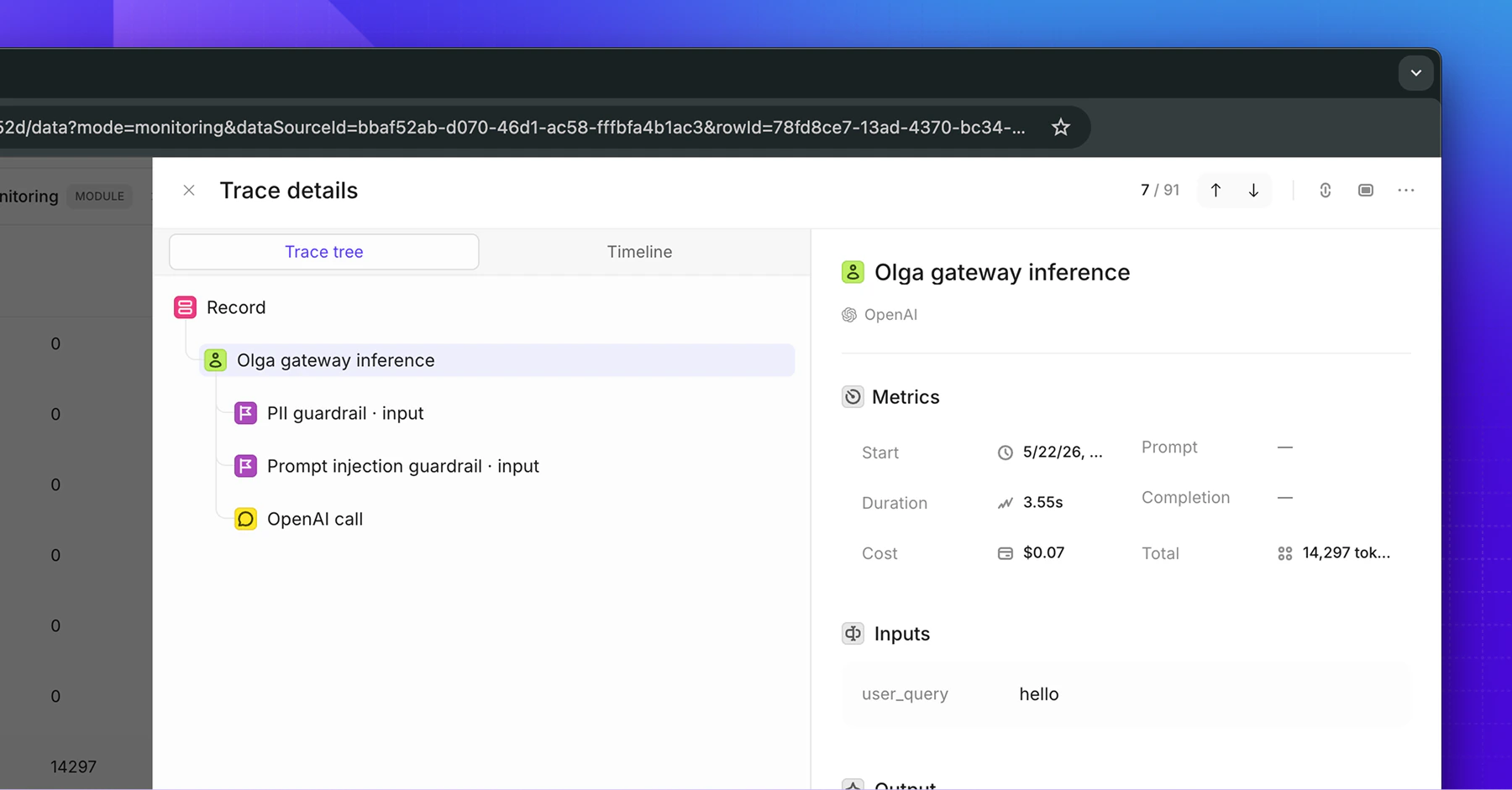
Each trace captures the full shape of the request:
* The **model** and **provider** that served it.
* **Input** messages and the **output** text.
* **Tokens**, **latency**, and **cost**.
* **Status**, success or error, with the error message when one occurs.
* Any **guardrail** violations, as steps in the trace.
* Any **media** in the request or response.
## What's in a trace
Each trace captures the full shape of the request:
* The **model** and **provider** that served it.
* **Input** messages and the **output** text.
* **Tokens**, **latency**, and **cost**.
* **Status**, success or error, with the error message when one occurs.
* Any **guardrail** violations, as steps in the trace.
* Any **media** in the request or response.
 ### Media in traces
Images and documents sent to or returned by a model are carried into the trace as attachments. The
gateway uploads the bytes to Openlayer storage and the trace references them, rather than carrying
base64 inline, so a trace with a large image stays readable.
Two deployment-wide options govern this: whether to upload attachment bytes at all, and whether to
upload media a request supplied as a URL. Attachment uploads are on and URL uploads are off by
default. Ask us to change them if you need media kept out of Openlayer entirely.
## Attribute traffic to a user
When an [API key](/docs/gateway/api-keys) is created with a **User ID**, every request it makes carries
that ID into the trace. In Openlayer you can then group and filter traffic by user.
## It never blocks a response
Tracing is fire-and-forget. The gateway sends each trace in the background after the response has
gone out, so observability never slows a request down, and never fails one if Openlayer is
unreachable.
## Correlate with your logs
Send an `X-Request-ID` header with a request and the gateway uses it as the trace ID, so you can
line up your own logs with the trace in Openlayer. Omit it and the gateway generates one.
## Go further
Traces are the foundation for Openlayer's monitoring: run tests on your live traffic, track quality
over time, and get alerted when something regresses. See the
[Observability section](/docs/monitoring/overview) to set that up.
This documentation is built and hosted on [Mintlify](https://mintlify.com), a developer documentation platform.
### Media in traces
Images and documents sent to or returned by a model are carried into the trace as attachments. The
gateway uploads the bytes to Openlayer storage and the trace references them, rather than carrying
base64 inline, so a trace with a large image stays readable.
Two deployment-wide options govern this: whether to upload attachment bytes at all, and whether to
upload media a request supplied as a URL. Attachment uploads are on and URL uploads are off by
default. Ask us to change them if you need media kept out of Openlayer entirely.
## Attribute traffic to a user
When an [API key](/docs/gateway/api-keys) is created with a **User ID**, every request it makes carries
that ID into the trace. In Openlayer you can then group and filter traffic by user.
## It never blocks a response
Tracing is fire-and-forget. The gateway sends each trace in the background after the response has
gone out, so observability never slows a request down, and never fails one if Openlayer is
unreachable.
## Correlate with your logs
Send an `X-Request-ID` header with a request and the gateway uses it as the trace ID, so you can
line up your own logs with the trace in Openlayer. Omit it and the gateway generates one.
## Go further
Traces are the foundation for Openlayer's monitoring: run tests on your live traffic, track quality
over time, and get alerted when something regresses. See the
[Observability section](/docs/monitoring/overview) to set that up.
This documentation is built and hosted on [Mintlify](https://mintlify.com), a developer documentation platform.